Code Folding
Whittl's editor supports AST-powered folding — click a function or class header and it collapses to a single line, making large files navigable without endless scrolling.
Same file, unfolded vs fully folded:
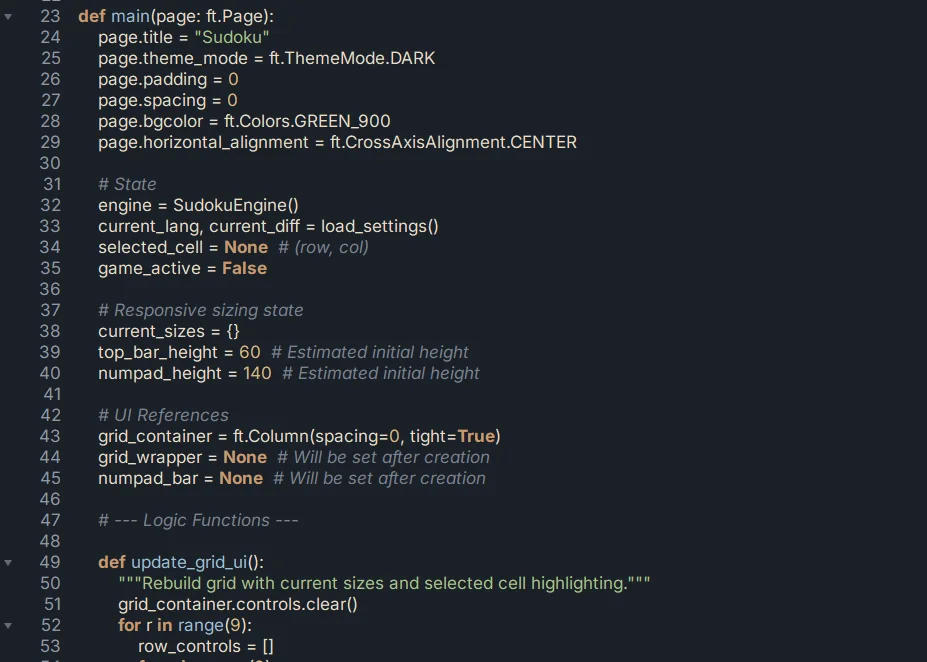
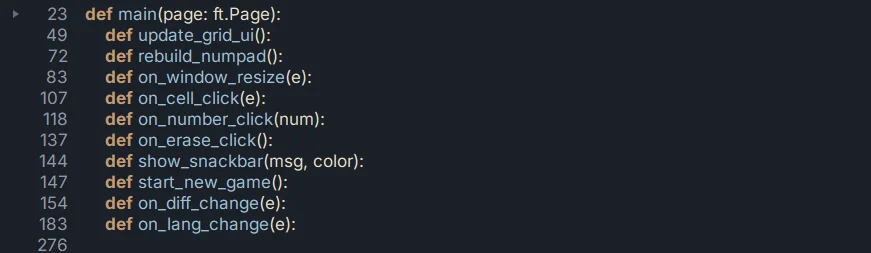
The folded view takes 250+ lines of main.py and reduces it to the 11 function signatures that matter for navigation. Click any fold marker to expand just that block and keep everything else collapsed.
How it works
The editor parses your Python file into an AST in the background. Foldable regions are any block that has an indented body:
- Function definitions (
def,async def) - Class definitions
if/elif/elsebranches with bodyfor/whileloopswithblockstry/except/finallyblocks- Decorator stacks above a
def/class
Fold markers appear in the left gutter next to any foldable header. Click one to collapse the block.
Keyboard shortcuts
| Action | Key |
|---|---|
| Fold all blocks | Ctrl+Shift+[ |
| Unfold all blocks | Ctrl+Shift+] |
| Fold / unfold a single block | Click gutter marker next to the block header |
Per-block fold via keyboard is still unassigned. Use the gutter markers for individual blocks and the fold-all / unfold-all shortcuts for bulk operations.
Folding persists across saves (partially)
Fold state is preserved in the editor session — switching between files and coming back restores the folds. On file save, folds are retained. On app restart, folds reset (files reopen fully expanded).
If you habitually fold large blocks at specific points, this is a limitation worth knowing.
Combining with search
Ctrl+F search jumps into folded blocks if the match is inside one (auto-unfolds on match). This makes folded-skeleton-view navigation practical: fold everything, search for what you want, land there with that block unfolded.
Why AST-powered specifically
A regex-based folder would break on unusual Python — triple-quoted docstrings containing def, comments that look like function signatures, nested f-strings. The AST parser only folds what Python itself considers a block, which means folding is correct even on tricky code.
Side effect: if your file has a syntax error, folding for the affected region won't work until you fix the error. The rest of the file still folds normally.
What's next
- Multi-file Projects — folding is most useful on large multi-file projects
- Keyboard Shortcuts — full shortcut list